Laravel Prompts
📝 此頁面為 Laravel 官方文檔的繁體中文翻譯。查看原始英文版本
簡介
Laravel Prompts 是一個 PHP 套件,用於為您的命令列應用程式添加漂亮且使用者友好的表單,具有類似瀏覽器的功能,包括佔位符文字和驗證。
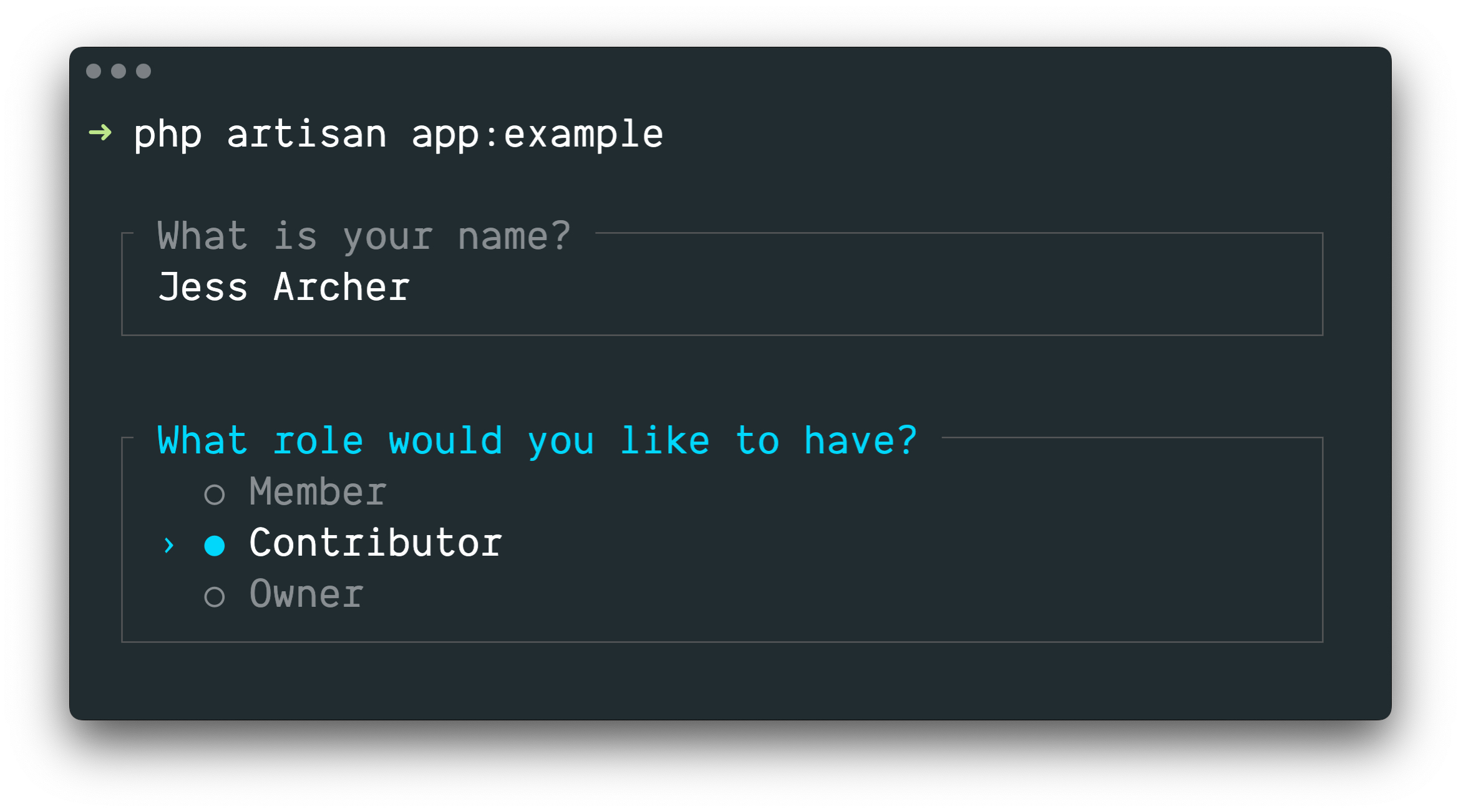
Laravel Prompts 非常適合在您的 Artisan 控制台命令中接受使用者輸入,但它也可以在任何命令列 PHP 專案中使用。
[!NOTE] Laravel Prompts 支援 macOS、Linux 和帶有 WSL 的 Windows。有關更多資訊,請參閱我們關於不支援的環境和後備方案的文檔。
安裝
Laravel Prompts 已包含在 Laravel 的最新版本中。
Laravel Prompts 還可以透過 Composer 套件管理器安裝在您的其他 PHP 專案中:
composer require laravel/prompts
可用提示
文字
text 函數將使用給定的問題提示使用者,接受他們的輸入,然後返回它:
use function Laravel\Prompts\text;

$name = text('What is your name?');
您還可以包含佔位符文字、預設值和資訊提示:
$name = text(
    label: 'What is your name?',
    placeholder: 'E.g. Taylor Otwell',
    default: $user?->name,
    hint: 'This will be displayed on your profile.'
);
必需值
如果您需要輸入值,可以傳遞 required 參數:
$name = text(
    label: 'What is your name?',
    required: true
);
如果您希望自訂驗證訊息,也可以傳遞一個字串:
$name = text(
    label: 'What is your name?',
    required: 'Your name is required.'
);
額外驗證
最後,如果您希望執行額外的驗證邏輯,可以將一個閉包傳遞給 validate 參數:
$name = text(
    label: 'What is your name?',
    validate: fn (string $value) => match (true) {
        strlen($value) < 3 => 'The name must be at least 3 characters.',
        strlen($value) > 255 => 'The name must not exceed 255 characters.',
        default => null
    }
);
閉包將接收已輸入的值,並可以返回一個錯誤訊息,或者如果驗證透過則返回 null。
或者,您可以利用 Laravel 的驗證器的強大功能。為此,請向 validate 參數提供一個包含屬性名稱和所需驗證規則的陣列:
$name = text(
    label: 'What is your name?',
    validate: ['name' => 'required|max:255|unique:users']
);
文字區域
textarea 函數將使用給定的問題提示使用者,透過多行文字區域接受他們的輸入,然後返回它:
use function Laravel\Prompts\textarea;

$story = textarea('Tell me a story.');
您還可以包含佔位符文字、預設值和資訊提示:
$story = textarea(
    label: 'Tell me a story.',
    placeholder: 'This is a story about...',
    hint: 'This will be displayed on your profile.'
);
必需值
如果您需要輸入值,可以傳遞 required 參數:
$story = textarea(
    label: 'Tell me a story.',
    required: true
);
如果您希望自訂驗證訊息,也可以傳遞一個字串:
$story = textarea(
    label: 'Tell me a story.',
    required: 'A story is required.'
);
額外驗證
最後,如果您希望執行額外的驗證邏輯,可以將一個閉包傳遞給 validate 參數:
$story = textarea(
    label: 'Tell me a story.',
    validate: fn (string $value) => match (true) {
        strlen($value) < 250 => 'The story must be at least 250 characters.',
        strlen($value) > 10000 => 'The story must not exceed 10,000 characters.',
        default => null
    }
);
閉包將接收已輸入的值,並可以返回一個錯誤訊息,或者如果驗證透過則返回 null。
或者,您可以利用 Laravel 的驗證器的強大功能。為此,請向 validate 參數提供一個包含屬性名稱和所需驗證規則的陣列:
$story = textarea(
    label: 'Tell me a story.',
    validate: ['story' => 'required|max:10000']
);
數字
number 函數將使用給定的問題提示使用者,接受他們的數字輸入,然後返回它。number 函數允許使用者使用上下方向鍵來操作數字:
use function Laravel\Prompts\number;

$number = number('How many copies would you like?');
您還可以包含佔位符文字、預設值和資訊提示:
$name = number(
    label: 'How many copies would you like?',
    placeholder: '5',
    default: 1,
    hint: 'This will be determine how many copies to create.'
);
必需值
如果您需要輸入值,可以傳遞 required 參數:
$copies = number(
    label: 'How many copies would you like?',
    required: true
);
如果您希望自訂驗證訊息,也可以傳遞一個字串:
$copies = number(
    label: 'How many copies would you like?',
    required: 'A number of copies is required.'
);
額外驗證
最後,如果您希望執行額外的驗證邏輯,可以將一個閉包傳遞給 validate 參數:
$copies = number(
    label: 'How many copies would you like?',
    validate: fn (?int $value) => match (true) {
        $value < 1 => 'At least one copy is required.',
        $value > 100 => 'You may not create more than 100 copies.',
        default => null
    }
);
閉包將接收已輸入的值,並可以返回一個錯誤訊息,或者如果驗證透過則返回 null。
或者,您可以利用 Laravel 的驗證器的強大功能。為此,請向 validate 參數提供一個包含屬性名稱和所需驗證規則的陣列:
$copies = number(
    label: 'How many copies would you like?',
    validate: ['copies' => 'required|integer|min:1|max:100']
);
密碼
password 函數與 text 函數類似,但使用者在控制台中輸入時,其輸入將被遮罩。當詢問敏感資訊(如密碼)時,這很有用:
use function Laravel\Prompts\password;

$password = password('What is your password?');
您還可以包含佔位符文字和資訊提示:
$password = password(
    label: 'What is your password?',
    placeholder: 'password',
    hint: 'Minimum 8 characters.'
);
必需值
如果您需要輸入值,可以傳遞 required 參數:
$password = password(
    label: 'What is your password?',
    required: true
);
如果您希望自訂驗證訊息,也可以傳遞一個字串:
$password = password(
    label: 'What is your password?',
    required: 'The password is required.'
);
額外驗證
最後,如果您希望執行額外的驗證邏輯,可以將一個閉包傳遞給 validate 參數:
$password = password(
    label: 'What is your password?',
    validate: fn (string $value) => match (true) {
        strlen($value) < 8 => 'The password must be at least 8 characters.',
        default => null
    }
);
閉包將接收已輸入的值,並可以返回一個錯誤訊息,或者如果驗證透過則返回 null。
或者,您可以利用 Laravel 的驗證器的強大功能。為此,請向 validate 參數提供一個包含屬性名稱和所需驗證規則的陣列:
$password = password(
    label: 'What is your password?',
    validate: ['password' => 'min:8']
);
確認
如果您需要向使用者詢問「是或否」的確認,可以使用 confirm 函數。使用者可以使用方向鍵或按 y 或 n 來選擇他們的回應。此函數將返回 true 或 false。
use function Laravel\Prompts\confirm;

$confirmed = confirm('Do you accept the terms?');
您還可以包含一個預設值、「是」和「否」標籤的自訂措辭,以及一個資訊提示:
$confirmed = confirm(
    label: 'Do you accept the terms?',
    default: false,
    yes: 'I accept',
    no: 'I decline',
    hint: 'The terms must be accepted to continue.'
);
要求「是」
如果需要,您可以透過傳遞 required 參數來要求使用者選擇「是」:
$confirmed = confirm(
    label: 'Do you accept the terms?',
    required: true
);
如果您希望自訂驗證訊息,也可以傳遞一個字串:
$confirmed = confirm(
    label: 'Do you accept the terms?',
    required: 'You must accept the terms to continue.'
);
選擇
如果您需要使用者從預定義的選項集中進行選擇,可以使用 select 函數:
use function Laravel\Prompts\select;

$role = select(
    label: 'What role should the user have?',
    options: ['Member', 'Contributor', 'Owner']
);
您還可以指定預設選項和一個資訊提示:
$role = select(
    label: 'What role should the user have?',
    options: ['Member', 'Contributor', 'Owner'],
    default: 'Owner',
    hint: 'The role may be changed at any time.'
);
您還可以向 options 參數傳遞一個關聯陣列,以便返回選中的鍵而不是其值:
$role = select(
    label: 'What role should the user have?',
    options: [
        'member' => 'Member',
        'contributor' => 'Contributor',
        'owner' => 'Owner',
    ],
    default: 'owner'
);
在列表開始滾動之前,最多會顯示五個選項。您可以透過傳遞 scroll 參數來自訂此設定:
$role = select(
    label: 'Which category would you like to assign?',
    options: Category::pluck('name', 'id'),
    scroll: 10
);
次要資訊
info 參數可用於顯示有關當前突出顯示選項的額外資訊。當提供一個閉包時,它將接收當前突出顯示選項的值,並應返回一個字串或 null:
$role = select(
    label: 'What role should the user have?',
    options: [
        'member' => 'Member',
        'contributor' => 'Contributor',
        'owner' => 'Owner',
    ],
    info: fn (string $value) => match ($value) {
        'member' => 'Can view and comment.',
        'contributor' => 'Can view, comment, and edit.',
        'owner' => 'Full access to all resources.',
        default => null,
    }
);
如果資訊不依賴於突出顯示的選項,您還可以向 info 參數傳遞一個靜態字串:
$role = select(
    label: 'What role should the user have?',
    options: ['Member', 'Contributor', 'Owner'],
    info: 'The role may be changed at any time.'
);
額外驗證
與其他提示函數不同,select 函數不接受 required 參數,因為不可能什麼都不選。但是,如果您需要呈現一個選項但防止其被選中,可以將一個閉包傳遞給 validate 參數:
$role = select(
    label: 'What role should the user have?',
    options: [
        'member' => 'Member',
        'contributor' => 'Contributor',
        'owner' => 'Owner',
    ],
    validate: fn (string $value) =>
        $value === 'owner' && User::where('role', 'owner')->exists()
            ? 'An owner already exists.'
            : null
);
如果 options 參數是一個關聯陣列,則閉包將接收選中的鍵,否則它將接收選中的值。閉包可以返回一個錯誤訊息,或者如果驗證透過則返回 null。
多選
如果您需要使用者能夠選擇多個選項,可以使用 multiselect 函數:
use function Laravel\Prompts\multiselect;

$permissions = multiselect(
    label: 'What permissions should be assigned?',
    options: ['Read', 'Create', 'Update', 'Delete']
);
您還可以指定預設選項和一個資訊提示:
use function Laravel\Prompts\multiselect;

$permissions = multiselect(
    label: 'What permissions should be assigned?',
    options: ['Read', 'Create', 'Update', 'Delete'],
    default: ['Read', 'Create'],
    hint: 'Permissions may be updated at any time.'
);
您還可以向 options 參數傳遞一個關聯陣列,以便返回選中選項的鍵而不是其值:
$permissions = multiselect(
    label: 'What permissions should be assigned?',
    options: [
        'read' => 'Read',
        'create' => 'Create',
        'update' => 'Update',
        'delete' => 'Delete',
    ],
    default: ['read', 'create']
);
在列表開始滾動之前,最多會顯示五個選項。您可以透過傳遞 scroll 參數來自訂此設定:
$categories = multiselect(
    label: 'What categories should be assigned?',
    options: Category::pluck('name', 'id'),
    scroll: 10
);
次要資訊
info 參數可用於顯示有關當前突出顯示選項的額外資訊。當提供一個閉包時,它將接收當前突出顯示選項的值,並應返回一個字串或 null:
$permissions = multiselect(
    label: 'What permissions should be assigned?',
    options: [
        'read' => 'Read',
        'create' => 'Create',
        'update' => 'Update',
        'delete' => 'Delete',
    ],
    info: fn (string $value) => match ($value) {
        'read' => 'View resources and their properties.',
        'create' => 'Create new resources.',
        'update' => 'Modify existing resources.',
        'delete' => 'Permanently remove resources.',
        default => null,
    }
);
要求一個值
預設情況下,使用者可以選擇零個或多個選項。您可以傳遞 required 參數來強制選擇一個或多個選項:
$categories = multiselect(
    label: 'What categories should be assigned?',
    options: Category::pluck('name', 'id'),
    required: true
);
如果您希望自訂驗證訊息,可以向 required 參數提供一個字串:
$categories = multiselect(
    label: 'What categories should be assigned?',
    options: Category::pluck('name', 'id'),
    required: 'You must select at least one category'
);
額外驗證
如果您需要呈現一個選項但防止其被選中,可以將一個閉包傳遞給 validate 參數:
$permissions = multiselect(
    label: 'What permissions should the user have?',
    options: [
        'read' => 'Read',
        'create' => 'Create',
        'update' => 'Update',
        'delete' => 'Delete',
    ],
    validate: fn (array $values) => ! in_array('read', $values)
        ? 'All users require the read permission.'
        : null
);
如果 options 參數是一個關聯陣列,則閉包將接收選中的鍵,否則它將接收選中的值。閉包可以返回一個錯誤訊息,或者如果驗證透過則返回 null。
建議
suggest 函數可用於為可能的選項提供自動完成。使用者仍然可以提供任何答案,無論自動完成提示如何:
use function Laravel\Prompts\suggest;

$name = suggest('What is your name?', ['Taylor', 'Dayle']);
或者,您可以將一個閉包作為第二個參數傳遞給 suggest 函數。每次使用者輸入一個字元時都會呼叫該閉包。閉包應接受一個包含到目前為止使用者輸入的字串參數,並返回一個用於自動完成的選項陣列:
$name = suggest(
    label: 'What is your name?',
    options: fn ($value) => collect(['Taylor', 'Dayle'])
        ->filter(fn ($name) => Str::contains($name, $value, ignoreCase: true))
)
您還可以包含佔位符文字、預設值和資訊提示:
$name = suggest(
    label: 'What is your name?',
    options: ['Taylor', 'Dayle'],
    placeholder: 'E.g. Taylor',
    default: $user?->name,
    hint: 'This will be displayed on your profile.'
);
次要資訊
info 參數可用於顯示有關當前突出顯示選項的額外資訊。當提供一個閉包時,它將接收當前突出顯示選項的值,並應返回一個字串或 null:
$name = suggest(
    label: 'What is your name?',
    options: ['Taylor', 'Dayle'],
    info: fn (string $value) => match ($value) {
        'Taylor' => 'Administrator',
        'Dayle' => 'Contributor',
        default => null,
    }
);
必需值
如果您需要輸入值,可以傳遞 required 參數:
$name = suggest(
    label: 'What is your name?',
    options: ['Taylor', 'Dayle'],
    required: true
);
如果您希望自訂驗證訊息,也可以傳遞一個字串:
$name = suggest(
    label: 'What is your name?',
    options: ['Taylor', 'Dayle'],
    required: 'Your name is required.'
);
額外驗證
最後,如果您希望執行額外的驗證邏輯,可以將一個閉包傳遞給 validate 參數:
$name = suggest(
    label: 'What is your name?',
    options: ['Taylor', 'Dayle'],
    validate: fn (string $value) => match (true) {
        strlen($value) < 3 => 'The name must be at least 3 characters.',
        strlen($value) > 255 => 'The name must not exceed 255 characters.',
        default => null
    }
);
閉包將接收已輸入的值,並可以返回一個錯誤訊息,或者如果驗證透過則返回 null。
或者,您可以利用 Laravel 的驗證器的強大功能。為此,請向 validate 參數提供一個包含屬性名稱和所需驗證規則的陣列:
$name = suggest(
    label: 'What is your name?',
    options: ['Taylor', 'Dayle'],
    validate: ['name' => 'required|min:3|max:255']
);
搜尋
如果您有大量選項供使用者選擇,search 函數允許使用者在使用方向鍵選擇選項之前輸入搜尋查詢來篩選結果:
use function Laravel\Prompts\search;

$id = search(
    label: 'Search for the user that should receive the mail',
    options: fn (string $value) => strlen($value) > 0
        ? User::whereLike('name', "%{$value}%")->pluck('name', 'id')->all()
        : []
);
閉包將接收使用者到目前為止已輸入的文字,並必須返回一個選項陣列。如果您返回一個關聯陣列,則將返回選中選項的鍵,否則將返回其值。
篩選您打算返回值的陣列時,您應該使用 array_values 函數或 values Collection 方法來確保陣列不會變成關聯陣列:
$names = collect(['Taylor', 'Abigail']);

$selected = search(
    label: 'Search for the user that should receive the mail',
    options: fn (string $value) => $names
        ->filter(fn ($name) => Str::contains($name, $value, ignoreCase: true))
        ->values()
        ->all(),
);
您還可以包含佔位符文字和一個資訊提示:
$id = search(
    label: 'Search for the user that should receive the mail',
    placeholder: 'E.g. Taylor Otwell',
    options: fn (string $value) => strlen($value) > 0
        ? User::whereLike('name', "%{$value}%")->pluck('name', 'id')->all()
        : [],
    hint: 'The user will receive an email immediately.'
);
在列表開始滾動之前,最多會顯示五個選項。您可以透過傳遞 scroll 參數來自訂此設定:
$id = search(
    label: 'Search for the user that should receive the mail',
    options: fn (string $value) => strlen($value) > 0
        ? User::whereLike('name', "%{$value}%")->pluck('name', 'id')->all()
        : [],
    scroll: 10
);
次要資訊
info 參數可用於顯示有關當前突出顯示選項的額外資訊。當提供一個閉包時,它將接收當前突出顯示選項的值,並應返回一個字串或 null:
$id = search(
    label: 'Search for the user that should receive the mail',
    options: fn (string $value) => strlen($value) > 0
        ? User::whereLike('name', "%{$value}%")->pluck('name', 'id')->all()
        : [],
    info: fn (int $userId) => User::find($userId)?->email
);
額外驗證
如果您希望執行額外的驗證邏輯,可以將一個閉包傳遞給 validate 參數:
$id = search(
    label: 'Search for the user that should receive the mail',
    options: fn (string $value) => strlen($value) > 0
        ? User::whereLike('name', "%{$value}%")->pluck('name', 'id')->all()
        : [],
    validate: function (int|string $value) {
        $user = User::findOrFail($value);

        if ($user->opted_out) {
            return 'This user has opted-out of receiving mail.';
        }
    }
);
如果 options 閉包返回一個關聯陣列,則閉包將接收選中的鍵,否則它將接收選中的值。閉包可以返回一個錯誤訊息,或者如果驗證透過則返回 null。
多搜尋
如果您有大量可搜尋的選項,並且需要使用者能夠選擇多個項目,multisearch 函數允許使用者在使用方向鍵和空格鍵選擇選項之前輸入搜尋查詢來篩選結果:
use function Laravel\Prompts\multisearch;

$ids = multisearch(
    'Search for the users that should receive the mail',
    fn (string $value) => strlen($value) > 0
        ? User::whereLike('name', "%{$value}%")->pluck('name', 'id')->all()
        : []
);
閉包將接收使用者到目前為止已輸入的文字,並必須返回一個選項陣列。如果您返回一個關聯陣列,則將返回選中選項的鍵;否則,將返回它們的值。
篩選您打算返回值的陣列時,您應該使用 array_values 函數或 values Collection 方法來確保陣列不會變成關聯陣列:
$names = collect(['Taylor', 'Abigail']);

$selected = multisearch(
    label: 'Search for the users that should receive the mail',
    options: fn (string $value) => $names
        ->filter(fn ($name) => Str::contains($name, $value, ignoreCase: true))
        ->values()
        ->all(),
);
您還可以包含佔位符文字和一個資訊提示:
$ids = multisearch(
    label: 'Search for the users that should receive the mail',
    placeholder: 'E.g. Taylor Otwell',
    options: fn (string $value) => strlen($value) > 0
        ? User::whereLike('name', "%{$value}%")->pluck('name', 'id')->all()
        : [],
    hint: 'The user will receive an email immediately.'
);
在列表開始滾動之前,最多會顯示五個選項。您可以透過提供 scroll 參數來自訂此設定:
$ids = multisearch(
    label: 'Search for the users that should receive the mail',
    options: fn (string $value) => strlen($value) > 0
        ? User::whereLike('name', "%{$value}%")->pluck('name', 'id')->all()
        : [],
    scroll: 10
);
次要資訊
info 參數可用於顯示有關當前突出顯示選項的額外資訊。當提供一個閉包時,它將接收當前突出顯示選項的值,並應返回一個字串或 null:
$ids = multisearch(
    label: 'Search for the users that should receive the mail',
    options: fn (string $value) => strlen($value) > 0
        ? User::whereLike('name', "%{$value}%")->pluck('name', 'id')->all()
        : [],
    info: fn (int $userId) => User::find($userId)?->email
);
要求一個值
預設情況下,使用者可以選擇零個或多個選項。您可以傳遞 required 參數來強制選擇一個或多個選項:
$ids = multisearch(
    label: 'Search for the users that should receive the mail',
    options: fn (string $value) => strlen($value) > 0
        ? User::whereLike('name', "%{$value}%")->pluck('name', 'id')->all()
        : [],
    required: true
);
如果您希望自訂驗證訊息,也可以向 required 參數提供一個字串:
$ids = multisearch(
    label: 'Search for the users that should receive the mail',
    options: fn (string $value) => strlen($value) > 0
        ? User::whereLike('name', "%{$value}%")->pluck('name', 'id')->all()
        : [],
    required: 'You must select at least one user.'
);
額外驗證
如果您希望執行額外的驗證邏輯,可以將一個閉包傳遞給 validate 參數:
$ids = multisearch(
    label: 'Search for the users that should receive the mail',
    options: fn (string $value) => strlen($value) > 0
        ? User::whereLike('name', "%{$value}%")->pluck('name', 'id')->all()
        : [],
    validate: function (array $values) {
        $optedOut = User::whereLike('name', '%a%')->findMany($values);

        if ($optedOut->isNotEmpty()) {
            return $optedOut->pluck('name')->join(', ', ', and ').' have opted out.';
        }
    }
);
如果 options 閉包返回一個關聯陣列,則閉包將接收選中的鍵;否則,它將接收選中的值。閉包可以返回一個錯誤訊息,或者如果驗證透過則返回 null。
暫停
pause 函數可用於向使用者顯示資訊文字,並等待他們透過按 Enter/Return 鍵來確認他們希望繼續:
use function Laravel\Prompts\pause;

pause('Press ENTER to continue.');
自動完成
autocomplete 函數可用於為可能的選項提供內聯自動完成。當使用者輸入時,與其輸入匹配的建議將作為幽靈文字出現,可以透過按 Tab 或右方向鍵來接受:
use function Laravel\Prompts\autocomplete;

$name = autocomplete(
    label: 'What is your name?',
    options: ['Taylor', 'Dayle', 'Jess', 'Nuno', 'Tim']
);
您還可以包含佔位符文字、預設值和一個資訊提示:
$name = autocomplete(
    label: 'What is your name?',
    options: ['Taylor', 'Dayle', 'Jess', 'Nuno', 'Tim'],
    placeholder: 'E.g. Taylor',
    default: $user?->name,
    hint: 'Use tab to accept, up/down to cycle.'
);
動態選項
您還可以傳遞一個閉包來根據使用者的輸入動態生成選項。每次使用者輸入一個字元時都會呼叫該閉包,並應返回一個用於自動完成的選項陣列:
$file = autocomplete(
    label: 'Which file?',
    options: fn (string $value) => collect($files)
        ->filter(fn ($file) => str_starts_with(strtolower($file), strtolower($value)))
        ->values()
        ->all(),
);
必需值
如果您需要輸入值,可以傳遞 required 參數:
$name = autocomplete(
    label: 'What is your name?',
    options: ['Taylor', 'Dayle', 'Jess', 'Nuno', 'Tim'],
    required: true
);
如果您希望自訂驗證訊息,也可以傳遞一個字串:
$name = autocomplete(
    label: 'What is your name?',
    options: ['Taylor', 'Dayle', 'Jess', 'Nuno', 'Tim'],
    required: 'Your name is required.'
);
額外驗證
最後,如果您希望執行額外的驗證邏輯,可以將一個閉包傳遞給 validate 參數:
$name = autocomplete(
    label: 'What is your name?',
    options: ['Taylor', 'Dayle', 'Jess', 'Nuno', 'Tim'],
    validate: fn (string $value) => match (true) {
        strlen($value) < 3 => 'The name must be at least 3 characters.',
        strlen($value) > 255 => 'The name must not exceed 255 characters.',
        default => null
    }
);
閉包將接收已輸入的值,並可以返回一個錯誤訊息,或者如果驗證透過則返回 null。
驗證前轉換輸入
有時您可能希望在驗證發生之前轉換提示輸入。例如,您可能希望從任何提供的字串中移除空白。為此,許多提示函數提供了一個 transform 參數,它接受一個閉包:
$name = text(
    label: 'What is your name?',
    transform: fn (string $value) => trim($value),
    validate: fn (string $value) => match (true) {
        strlen($value) < 3 => 'The name must be at least 3 characters.',
        strlen($value) > 255 => 'The name must not exceed 255 characters.',
        default => null
    }
);
表單
通常,您會有多個提示按順序顯示,以在執行額外操作之前收集資訊。您可以使用 form 函數來建立一個分組的提示集供使用者完成:
use function Laravel\Prompts\form;

$responses = form()
    ->text('What is your name?', required: true)
    ->password('What is your password?', validate: ['password' => 'min:8'])
    ->confirm('Do you accept the terms?')
    ->submit();
submit 方法將返回一個數字索引的陣列,其中包含來自表單提示的所有回應。但是,您可以透過 name 參數為每個提示提供一個名稱。當提供名稱時,可以透過該名稱存取命名提示的回應:
use App\Models\User;
use function Laravel\Prompts\form;

$responses = form()
    ->text('What is your name?', required: true, name: 'name')
    ->password(
        label: 'What is your password?',
        validate: ['password' => 'min:8'],
        name: 'password'
    )
    ->confirm('Do you accept the terms?')
    ->submit();

User::create([
    'name' => $responses['name'],
    'password' => $responses['password'],
]);
使用 form 函數的主要好處是使用者可以使用 CTRL + U 返回到表單中的先前提示。這允許使用者修復錯誤或更改選擇,而無需取消並重新啟動整個表單。
如果您需要對表單中的提示進行更精細的控制,可以呼叫 add 方法而不是直接呼叫提示函數之一。add 方法接收使用者提供的所有先前回應:
use function Laravel\Prompts\form;
use function Laravel\Prompts\outro;
use function Laravel\Prompts\text;

$responses = form()
    ->text('What is your name?', required: true, name: 'name')
    ->add(function ($responses) {
        return text("How old are you, {$responses['name']}?");
    }, name: 'age')
    ->submit();

outro("Your name is {$responses['name']} and you are {$responses['age']} years old.");
資訊訊息
note、info、warning、error 和 alert 函數可用於顯示資訊訊息:
use function Laravel\Prompts\info;

info('Package installed successfully.');
呼叫框
callout 函數顯示一個帶有標籤和內容的方框訊息。呼叫框適用於顯示應突出顯示的重要資訊,例如部署摘要、錯誤詳細資訊或狀態更新:
use function Laravel\Prompts\callout;

callout(
    label: 'Environment Configured',
    content: 'Your application is running in production mode with 4 workers.',
);
您可以傳遞 warning 或 error 作為 type 參數來變更呼叫框的視覺樣式:
callout(
    label: 'Deprecation Notice',
    content: 'The `--prefer-stable` flag will be removed in v4.0. Use `--stability=stable` instead.',
    type: 'warning',
);

callout(
    label: 'Database Connection Failed',
    content: 'Could not connect to MySQL on 127.0.0.1:3306.',
    type: 'error',
);
info 參數會向呼叫框添加一個頁腳行,這對於顯示元資料(如 ID 或時間戳)很有用:
callout(
    label: 'Deployment Summary',
    content: 'Your application was deployed to production.',
    info: 'deploy-id: d4f8a2c',
);
富內容
與其傳遞一個字串,您還可以傳遞一個字串和元素的陣列來建立富的、結構化的呼叫框。Element 類別提供了用於建立標題、項目符號列表、編號列表和鍵值列表的工廠方法:
use Laravel\Prompts\Elements\Element;

use function Laravel\Prompts\callout;

callout('Deployment Summary', [
    'Your application was deployed to production at 2024-03-15 14:32 UTC.',
    Element::heading('What Changed'),
    Element::bulletedList([
        'Migrated 3 pending database migrations',
        'Cleared and rebuilt route cache',
        'Restarted 4 queue workers',
    ]),
    Element::heading('Next Steps'),
    Element::numberedList([
        'Verify the health check endpoint at /up',
        'Monitor error rates for the next 15 minutes',
        'Confirm background jobs are processing',
    ]),
]);
您還可以使用 Element::keyValueList 來顯示標籤化的資料:
callout('Database Connection Failed', [
    'Could not connect to the database server.',
    Element::keyValueList([
        'Host' => '127.0.0.1',
        'Port' => '3306',
        'Database' => 'forge',
        'Status' => 'Connection refused',
    ]),
], type: 'error');
表格
table 函數使顯示多行和多列資料變得非常簡單。您只需要提供列名和表格的資料:
use function Laravel\Prompts\table;

table(
    headers: ['Name', 'Email'],
    rows: User::all(['name', 'email'])->toArray()
);
旋轉器
spin 函數在執行指定的回呼時顯示一個旋轉器和一個可選的訊息。它用於指示正在進行的過程,並在完成時返回回呼的結果:
use function Laravel\Prompts\spin;

$response = spin(
    callback: fn () => Http::get('http://example.com'),
    message: 'Fetching response...'
);
[!WARNING]
spin函數需要 PCNTL PHP 擴展才能製作旋轉器動畫。當此擴展不可用時,將顯示旋轉器的靜態版本。
進度列
對於長時間運行的任務,顯示一個進度列來告知使用者任務完成的程度會很有幫助。使用 progress 函數,Laravel 將顯示一個進度列,並在每次迭代給定的可迭代值時推進其進度:
use function Laravel\Prompts\progress;

$users = progress(
    label: 'Updating users',
    steps: User::all(),
    callback: fn ($user) => $this->performTask($user)
);
progress 函數的作用類似於映射函數,它將返回一個包含回呼每次迭代返回值的陣列。
回呼還可以接受 Laravel\Prompts\Progress 實例,允許您在每次迭代時修改標籤和提示:
$users = progress(
    label: 'Updating users',
    steps: User::all(),
    callback: function ($user, $progress) {
        $progress
            ->label("Updating {$user->name}")
            ->hint("Created on {$user->created_at}");

        return $this->performTask($user);
    },
    hint: 'This may take some time.'
);
有時,您可能需要對進度列的推進方式進行更多手動控制。首先,定義程序將迭代的總步驟數。然後,在處理每個項目後透過 advance 方法推進進度列:
$progress = progress(label: 'Updating users', steps: 10);

$users = User::all();

$progress->start();

foreach ($users as $user) {
    $this->performTask($user);

    $progress->advance();
}

$progress->finish();
任務
task 函數在執行給定回呼時顯示一個帶有標籤的任務、一個旋轉器和一個滾動的即時輸出區域。它非常適合包裝長時間運行的程序(如依賴安裝或部署腳本),提供對正在發生的事情的即時可見性:
use function Laravel\Prompts\task;

task(
    label: 'Installing dependencies',
    callback: function ($logger) {
        // 長時間運行的程序...
    }
);
回呼接收一個 Logger 實例,您可以使用它在任務的輸出區域中顯示日誌行、狀態訊息和串流文字。
[!WARNING]
task函數需要 PCNTL PHP 擴展才能製作旋轉器動畫。當此擴展不可用時,將顯示任務的靜態版本。
記錄行
line 方法將單個日誌行寫入任務的滾動輸出區域:
task(
    label: 'Installing dependencies',
    callback: function ($logger) {
        $logger->line('Resolving packages...');
        // ...
        $logger->line('Downloading laravel/framework');
        // ...
    }
);
狀態訊息
您可以使用 success、warning 和 error 方法來顯示狀態訊息。這些會作為穩定的、突出顯示的訊息出現在滾動日誌區域上方:
task(
    label: 'Deploying application',
    callback: function ($logger) {
        $logger->line('Pulling latest changes...');
        // ...
        $logger->success('Changes pulled!');

        $logger->line('Running migrations...');
        // ...
        $logger->warning('No new migrations to run.');

        $logger->line('Clearing cache...');
        // ...
        $logger->success('Cache cleared!');
    }
);
更新標籤
label 方法允許您在任務運行時更新其標籤:
task(
    label: 'Starting deployment...',
    callback: function ($logger) {
        $logger->label('Pulling latest changes...');
        // ...
        $logger->label('Running migrations...');
        // ...
        $logger->label('Clearing cache...');
        // ...
    }
);
顯示副標籤
subLabel 方法在任務主標籤下方顯示一行暗淡的文字,這對於傳達短暫狀態(如當前正在進行的步驟)很有用。傳遞一個空字串來清除副標籤:
task(
    label: 'Deploying',
    callback: function ($logger) {
        $logger->subLabel('Building assets...');
        // ...
        $logger->subLabel('Running migrations...');
        // ...
        $logger->subLabel('');
    }
);
您還可以透過 subLabel 參數提供一個初始副標籤:
task(
    label: 'Deploying',
    callback: function ($logger) {
        // ...
    },
    subLabel: 'Preparing...'
);
串流文字
對於增量產生輸出的程序(如 AI 生成的回應),partial 方法允許您逐字或逐塊地串流文字。串流完成後,請呼叫 commitPartial 來最終確定輸出:
task(
    label: 'Generating response...',
    callback: function ($logger) {
        foreach ($words as $word) {
            $logger->partial($word . ' ');
        }

        $logger->commitPartial();
    }
);
自訂輸出限制
預設情況下,任務最多顯示 10 行滾動輸出。您可以透過 limit 參數來自訂此設定:
task(
    label: 'Installing dependencies',
    callback: function ($logger) {
        // ...
    },
    limit: 20
);
保留摘要
預設情況下,任務的輸出會在回呼完成後被擦除。如果您希望在任務完成後在螢幕上保留狀態訊息,可以傳遞 keepSummary 參數:
task(
    label: 'Deploying',
    callback: function ($logger) {
        $logger->success('Assets built');
        // ...
        $logger->success('Migrations complete');
    },
    keepSummary: true,
);
串流
stream 函數顯示串流到終端機的文字,非常適合顯示 AI 生成的內容或任何增量到達的文字:
use function Laravel\Prompts\stream;

$stream = stream();

foreach ($words as $word) {
    $stream->append($word . ' ');
    usleep(25_000); // 模擬區塊之間的延遲...
}

$stream->close();
append 方法向串流添加文字,並以逐漸淡入的效果渲染它。當所有內容都已串流完畢後,請呼叫 close 方法來最終確定輸出並恢復游標。
終端機標題
title 函數更新使用者終端機視窗或標籤頁的標題:
use function Laravel\Prompts\title;

title('Installing Dependencies');
要將終端機標題重設為其預設值,請傳遞一個空字串:
title('');
清除終端機
clear 函數可用於清除使用者的終端機:
use function Laravel\Prompts\clear;

clear();
終端機考量
終端機寬度
如果任何標籤、選項或驗證訊息的長度超過使用者終端機的「列」數,它將被自動截斷以適應。如果您使用者可能使用較窄的終端機,請考慮最小化這些字串的長度。通常安全的最大長度為 74 個字元,以支援 80 個字元的終端機。
終端機高度
對於接受 scroll 參數的任何提示,配置的值將自動減少以適應使用者終端機的高度,包括驗證訊息的空間。
不支援的環境和後備方案
Laravel Prompts 支援 macOS、Linux 和帶有 WSL 的 Windows。由於 Windows 版本 PHP 的限制,目前無法在 WSL 之外的 Windows 上使用 Laravel Prompts。
為此,Laravel Prompts 支援回退到替代實現(如 Symfony Console Question Helper)。
[!NOTE] 將 Laravel Prompts 與 Laravel 框架一起使用時,每個提示的後備方案已為您配置,並且將在不支援的環境中自動啟用。
後備條件
如果您未使用 Laravel 或需要自訂何時使用後備行為,可以向 Prompt 類別上的 fallbackWhen 靜態方法傳遞一個布林值:
use Laravel\Prompts\Prompt;

Prompt::fallbackWhen(
    ! $input->isInteractive() || windows_os() || app()->runningUnitTests()
);
後備行為
如果您未使用 Laravel 或需要自訂後備行為,可以向每個提示類別上的 fallbackUsing 靜態方法傳遞一個閉包:
use Laravel\Prompts\TextPrompt;
use Symfony\Component\Console\Question\Question;
use Symfony\Component\Console\Style\SymfonyStyle;

TextPrompt::fallbackUsing(function (TextPrompt $prompt) use ($input, $output) {
    $question = (new Question($prompt->label, $prompt->default ?: null))
        ->setValidator(function ($answer) use ($prompt) {
            if ($prompt->required && $answer === null) {
                throw new \RuntimeException(
                    is_string($prompt->required) ? $prompt->required : 'Required.'
                );
            }

            if ($prompt->validate) {
                $error = ($prompt->validate)($answer ?? '');

                if ($error) {
                    throw new \RuntimeException($error);
                }
            }

            return $answer;
        });

    return (new SymfonyStyle($input, $output))
        ->askQuestion($question);
});
後備方案必須為每個提示類別單獨配置。閉包將接收提示類別的實例,並必須返回適合提示的適當類型。
測試
Laravel 提供了多種方法來測試您的命令是否顯示了預期的提示訊息:
test('report generation', function () {
    $this->artisan('report:generate')
        ->expectsPromptsInfo('Welcome to the application!')
        ->expectsPromptsWarning('This action cannot be undone')
        ->expectsPromptsError('Something went wrong')
        ->expectsPromptsAlert('Important notice!')
        ->expectsPromptsIntro('Starting process...')
        ->expectsPromptsOutro('Process completed!')
        ->expectsPromptsTable(
            headers: ['Name', 'Email'],
            rows: [
                ['Taylor Otwell', '[email protected]'],
                ['Jason Beggs', '[email protected]'],
            ]
        )
        ->assertExitCode(0);
});
public function test_report_generation(): void
{
    $this->artisan('report:generate')
        ->expectsPromptsInfo('Welcome to the application!')
        ->expectsPromptsWarning('This action cannot be undone')
        ->expectsPromptsError('Something went wrong')
        ->expectsPromptsAlert('Important notice!')
        ->expectsPromptsIntro('Starting process...')
        ->expectsPromptsOutro('Process completed!')
        ->expectsPromptsTable(
            headers: ['Name', 'Email'],
            rows: [
                ['Taylor Otwell', '[email protected]'],
                ['Jason Beggs', '[email protected]'],
            ]
        )
        ->assertExitCode(0);
}